
Modax DSD for Microsoft Dynamics 365
The delivery day,
run from Dynamics 365.
Direct store delivery for bakeries and route distributors. Plan the loads, load the trucks in stacks and baskets, deliver with a driver app, and post every delivery in Dynamics 365 Finance and Operations.
- Built for bakeries and route delivery
- Inside Dynamics 365
- No fee per driver, device or delivery
- From USD 900 per month
Why Modax DSD
The route, the freezer, the dock and the driver, on one plan.
Most delivery apps live next to the ERP and someone reconciles them at night. Modax DSD lives inside Dynamics 365: the orders are the plan, the plan is the loading slip, and the delivery is the invoice.
Dynamics 365 is the system of record
Customers, products, prices, batches and warehouses come from Dynamics 365 Finance and Operations. Every delivery, return and payment is posted there, under your own number sequences and parameters.
One plan from the office to the truck
The office plans the loads, the freezer pulls against one sheet, the loaders stack the trucks from a slip that already speaks in stacks and baskets, and the drivers deliver what was planned.
No second system to keep in line
The DSD module lives inside your Dynamics 365. Routes, stops, packing and parameters are set up in the forms your team already uses, with security roles of their own.
A walk through the day
From the open orders to the settled truck.
These are screens of the product, not drawings. The data is demo data: a bakery with one route, six stops and six products.
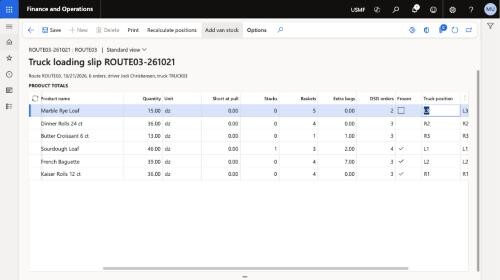
One click plans the day
- Each customer has a stop on a route, with delivery days and a stop sequence. The route of a sales order follows from its customer and delivery day, with an override per order.
- Plan DSD loads takes the open sales orders of the day: one load per route, orders in stop sequence, lines moved to the truck warehouse, a load-out transfer order for each truck.
- Late orders, including orders from the Modax Online Store, join the planned load until it is released to loading. An order can be moved to another day.
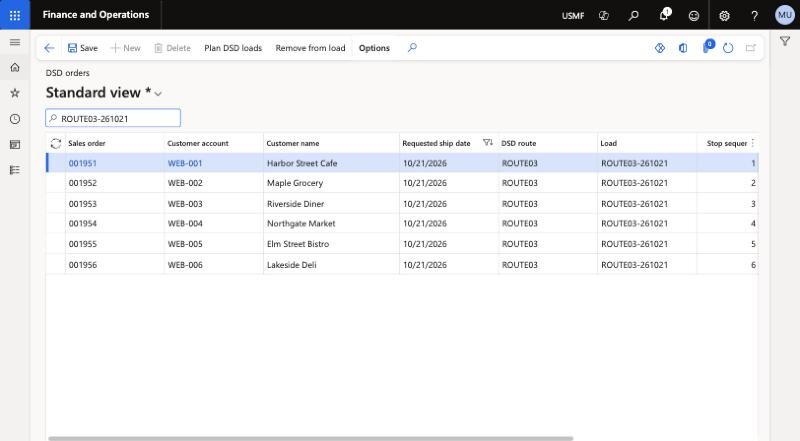
A loading slip that speaks in stacks and baskets
- Product totals of the load converted from dozens into stacks, baskets and extra bags by the packing set-up of each product.
- What each delivery needs, the placement of the stacks on the truck by position and side, and a drawing of the truck for the loaders.
- Stack labels, van stock per truck, and a confirmation of the load when the truck is ready to leave.
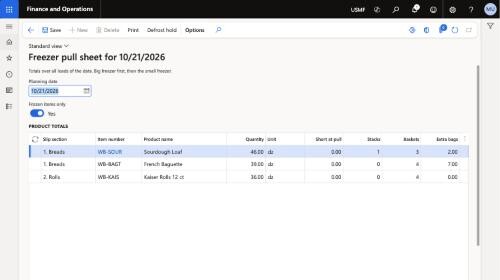
One pull sheet for the whole day
- The freezer pull sheet lists every frozen product of the day over all loads, in freezer sequence, with the lots to pull first expiry first.
- Defrost hold: bags pulled, bags validated, temperature and shelf-life check, released line by line or all at once. Off, optional or required, your choice.
- What the freezer validated short is shared across the trucks and carried to the loading slip and to the driver app, so nobody promises what is not on the truck.
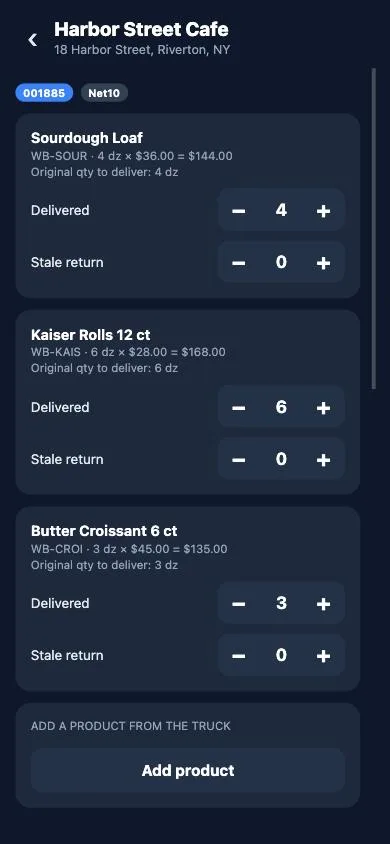
The stop, on the phone
- The driver signs in with their own Microsoft account and sees their loads: confirm the load, start the route, stops in sequence.
- Delivered and short quantities with reason codes, stale returns, products added at the door from the truck stock, baskets and wheels left and collected.
- Several orders of one customer are delivered together as one stop, with one signature.
Signature, payment, receipt
- Signature, photo and note on the delivery. Cash and checks collected at the door, with older open invoices and the cash discount where you allow it.
- A delivery receipt on the screen, printed from the device or sent by e-mail to the customer, as set per stop.
- A recorded delivery can be corrected until it is posted, and an optional review step stands before the confirmation.
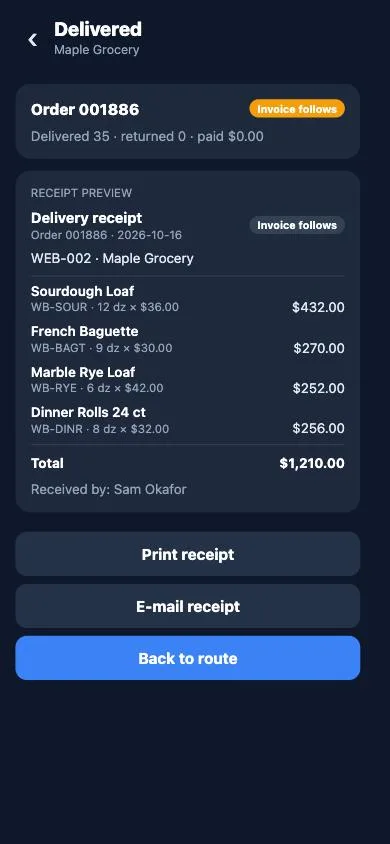
Every delivery lands in Dynamics 365
- Each delivery is posted as a packing slip or an invoice under your parameters, automatically when the route is completed or by the office.
- Stale returns become return orders, cash and checks become payment journals, and what comes back on the truck is received by an unload transfer order.
- A posting that fails is listed with its reason, corrected and posted again. Nothing is lost on the way.
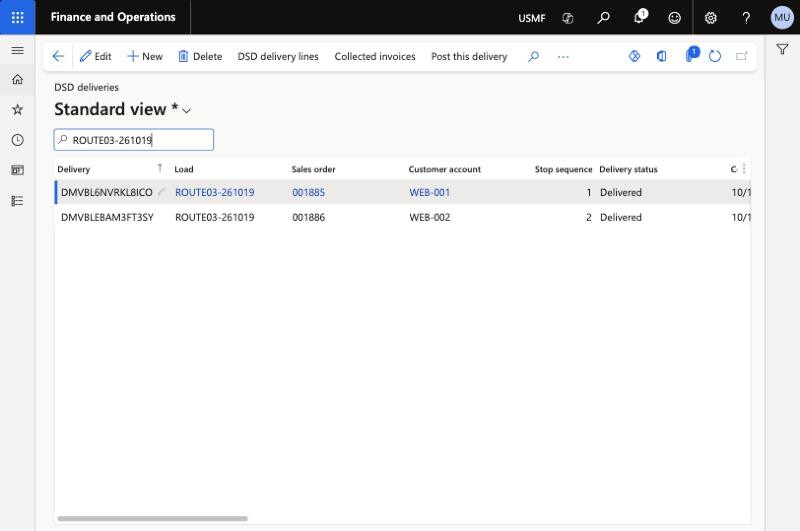
Settle and close the day
- The DSD operations workspace counts planned loads, routes in transit, deliveries to post, posting failures and loads to settle.
- The end-of-day summary per load: orders, delivered, short, not delivered, invoices, cash collected, baskets and wheels out and back.
- Settlement: counted cash and checks against what the driver recorded, returned equipment against what the truck should hold, variances recorded.
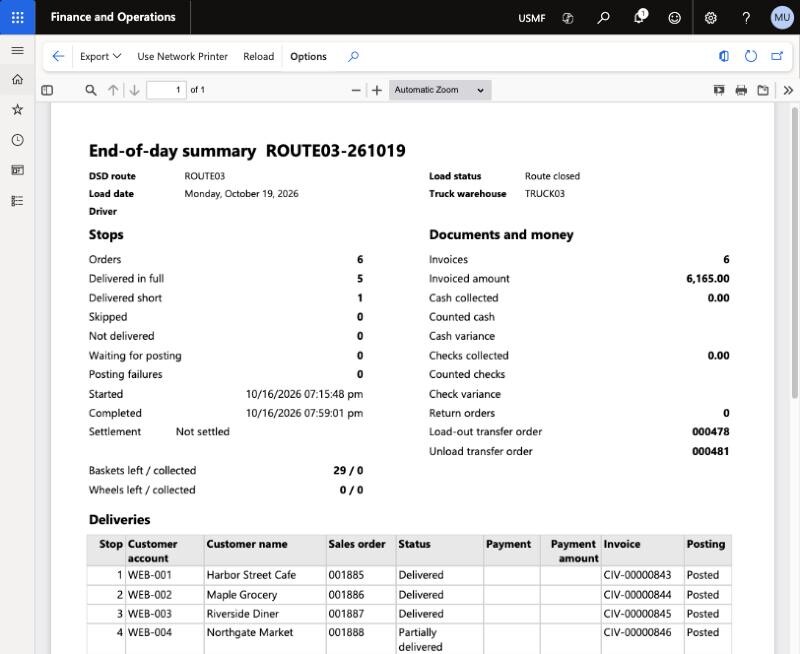
Set up in the forms your team already uses.
Modax DSD is a module inside Dynamics 365 Finance and Operations. Routes, stops, packing and every behaviour of the delivery day are set up there, by the people who maintain the master data today.
Routes and stops
A route with its truck warehouse, loading door and default driver. Stops per customer with delivery days, stop sequence and how the customer gets the receipt.
Product packing
Bags per basket, baskets per stack, bags per sales unit, freezer sequence and the section of the loading slip, per product.
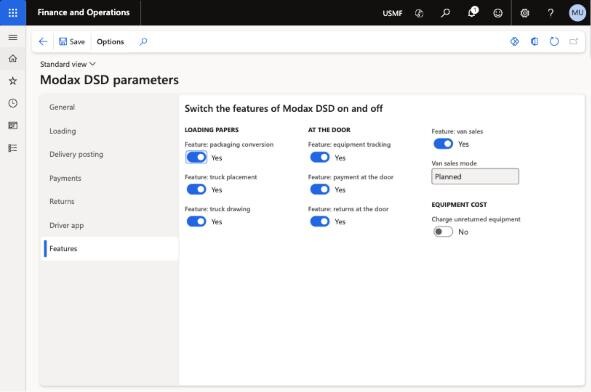
Parameters and feature switches
Posting mode, defrost hold, short at pull, van sales, payment at the door, load confirmation, equipment charges. Every behaviour is a parameter, not a customization.
Security roles
Modax DSD dispatcher, driver and viewer, assigned to your users like any other Dynamics 365 role. The driver role only reads standard records.
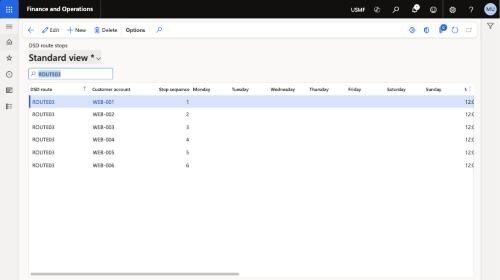
One day, followed from end to end
- Sales orders of the day on their routes
- Loads, load-out transfers
- Loading slip, pull sheet, stack labels
- Confirm load, stops in sequence
- Delivered, short, returns, van sales
- Payment, signature, receipt
- Packing slips and invoices
- Return orders, payment journals
- Unload transfer, settlement, end of day
On the truck
A driver app that knows the plan.
The driver sees the loads of the day, the stops in sequence and what each customer ordered. What happens at the door is recorded once, on the phone, and reaches Dynamics 365 as the documents your office expects.
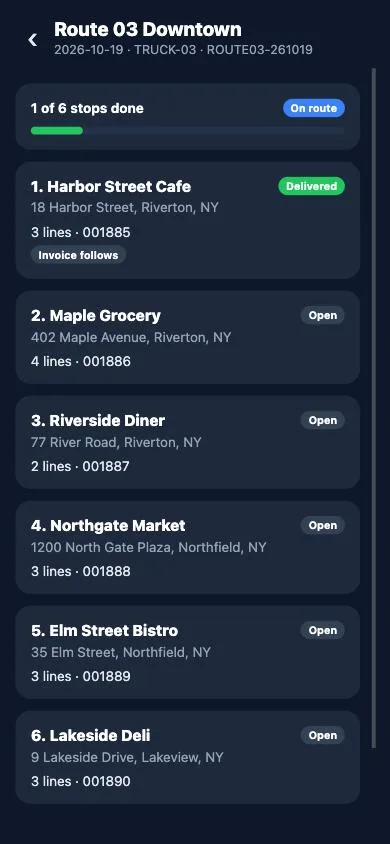
The route: the stops of the day, delivered ones marked, the next one first.
Works without a connection
The loads of the day stay on the device. Deliveries are sent when the connection is back, in order.
Returns and shorts
Stale returns and short deliveries with reason codes. The office sees them before the truck is back.
Van sales
Products added at the door from the truck stock, at the prices Dynamics 365 holds for that customer.
Payment at the door
Cash and checks, older open invoices, cash discount where allowed. Payment journals in Dynamics 365.
Baskets and wheels
Equipment left and collected at each stop, with a balance per customer and a count at settlement.
Receipt on paper or by e-mail
Printed from the device or sent to the customer from the phone, per stop, as the customer prefers.
How it runs
A module in your Dynamics 365 and an app on your drivers' phones.
Inside Dynamics 365
A module in your Dynamics 365 Finance and Operations environment: tables, pages, reports, data entities and the posting logic.
The driver app
iOS, Android and the browser, signed in with the driver's own Microsoft account. Updates arrive over the air.
Microsoft licences
One Dynamics 365 Team Members licence per driver. Office users keep the Finance or Supply Chain Management licences they have.
Your data stays yours
Everything is in your own Dynamics 365 environment, under Microsoft's security, backup and compliance.
Modax Online Store
Orders your customers place in the Modax Online Store land on the right route and load on their own.
Another ERP
On Dynamics 365 Finance and Operations the module lives inside your environment. For other ERPs, Business Central included, we deliver Modax DSD on its own portal, connected to the ERP you use, as a project with you.
Not on Dynamics 365?
We can bring Modax DSD to the ERP you already use.
Modax DSD on its own portal, with the same planning, loading slips, pull sheets, driver app and end of day, connected to your ERP so the orders come in and every delivery goes back to your books as the invoice. We build that connection together with the first customers on each ERP. Tell us which ERP you run and we show you how it would work.
- Orders from your ERP
- Deliveries back as invoices
- Customers, products and prices stay in your ERP
Pricing
Priced by the trucks you send out, not by the people who use it.
List prices in USD per month. A load is one truck leaving on one route on one day. Drivers, devices, routes, stops and deliveries are not counted, and there is no fee per delivery.
Starter
USD 900 per month
up to 120 loads a month, about 5 trucks a day
- Load planning, loading slip, stack labels, van stock
- Freezer pull sheet, defrost hold, short at pull
- Driver app on iOS, Android and web, works offline
- Returns, van sales, payment at the door, equipment
- Posting in Dynamics 365, end of day, settlement
Growth
USD 1,500 per month
up to 250 loads a month, about 10 trucks a day
- Everything in Starter
- Twice the loads
Enterprise
USD 2,500 per month
up to 600 loads a month, about 25 trucks a day
- Everything in Growth
- Customer notifications and analytics included
- A named customer success manager and a service level agreement
Microsoft licences
Not included. Each driver needs a Dynamics 365 Team Members licence, which we can supply as your licensing partner. Office users keep the Finance or Supply Chain Management licences they already have.
Implementation
Every deployment starts with an implementation by our Dynamics 365 consultants: the module in your environment, routes and stops, product packing, printing, the driver app on your devices, testing and training. Ask for a quote.
Support and updates
Product support during business hours, updates of the module and of the driver app are part of every plan. Support for your Dynamics 365 environment is available separately.
Terms
Billed monthly. 8% discount for annual prepayment. The prices above are list prices before taxes. If your loads exceed the plan two months in a row, we propose the plan that fits; there is no overage fee. Ask for a proposal.
Who it is for
Companies that deliver with their own trucks.
Bakeries, dairies and fresh food producers on fixed routes, beverage and snack distributors with route sales and returns, and wholesalers that want the delivery day connected to the books, not next to them. On Dynamics 365 Finance and Operations today; on another ERP, through the Modax DSD portal.
Questions we hear first
What is a load? +
One truck leaving on one route on one day. Plans are sized by loads a month because that is the one number that grows with your business. Drivers, devices, routes, stops and deliveries are not counted.
Does it replace our handhelds and paper? +
The driver app replaces the paper day cards and the manual conversion of dozens into baskets on the loading dock. The loading slip and the pull sheet still print, from Dynamics 365, in the form the loaders and the freezer use.
Which ERP does it work with? +
Dynamics 365 Finance and Operations, as a module inside your environment. For other ERPs, Business Central included, we deliver Modax DSD on its own portal connected to your ERP, together with you: the orders come in, and every delivery goes back to your books as the invoice. Tell us which ERP you run.
Which Microsoft licence does a driver need? +
A Dynamics 365 Team Members licence. The driver role of Modax DSD only reads standard records and writes its own, so the smallest licence covers it. Microsoft sets the rules; we keep the role within them.
Does the driver app work without a connection? +
Yes. The loads of the day stay on the device, deliveries are recorded offline and sent when the connection is back. The driver sees what is still waiting to be sent.
Can the customer pay at the door? +
Cash and checks, yes, with older open invoices and the cash discount where you allow it. Card terminals are not part of the product.
Can we see it with our own routes? +
Yes. Book a demo and we walk through a planned day: the loading slip, the pull sheet, a stop in the driver app, and the delivery as it posts in Dynamics 365.
See a delivery travel from the truck to Dynamics 365.
One session: a planned day, the loading slip, a stop in the driver app, and the invoice as it posts in Dynamics 365.