
Modax Guide for Microsoft Dynamics 365
Every user knows
the next step.
An in-app coach for Microsoft Dynamics 365 Finance and Operations. It lights up the field to use, says what to enter and why, and moves on when the step is done.
- Built from your own setup
- More than 150 guides
- Learning paths for 10 roles
- Edge and Chrome
Finance and Operations today. Business Central is coming in the next release.
Why Modax Guide
You hired someone new? Let Modax Guide help.
Training slides go out of date and generic help does not know your company. Modax Guide works on your own Finance and Operations pages, with your own data, at the moment the user needs it.
Built from your own setup
Guides use the vendors, items, sites, warehouses and parameters your company really uses, as they are set up in your Finance and Operations environment.
Approved by a Modax consultant
A consultant plays every guide on your sandbox, marks it validated and approves it. Only approved guides reach your users.
It points, it never acts
Modax Guide shows where to click and what to enter. It never clicks, types or changes anything for the user. The work stays theirs.
What users get
Guides, Learn, Ask and tickets, in one panel.
The panel opens on the Finance and Operations page the user is on. Everything in it is about that page and your company.
A spotlight on the next field
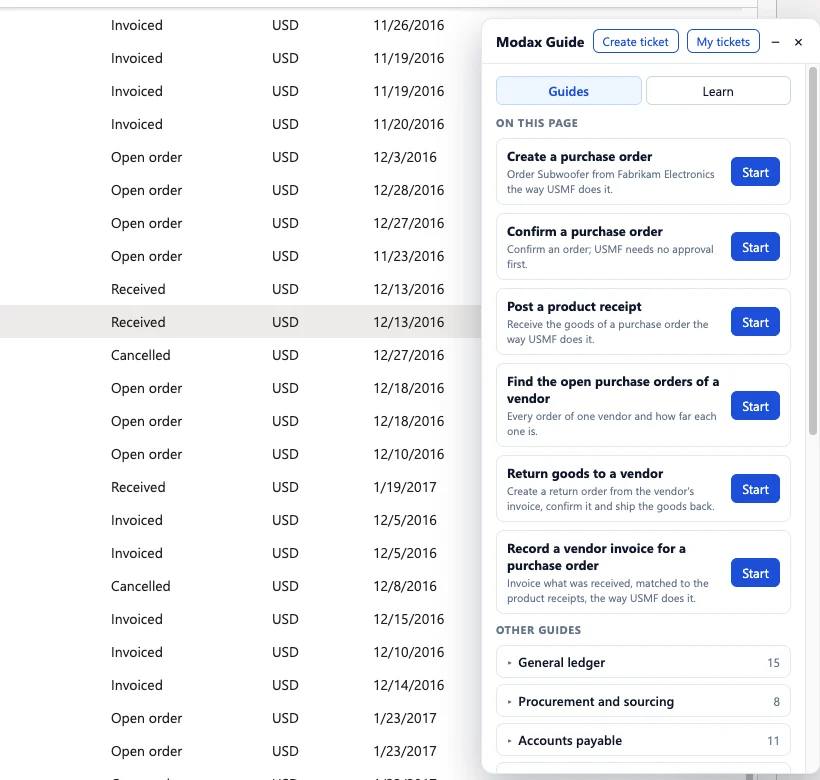
- The panel lists the guides for the page the user is on.
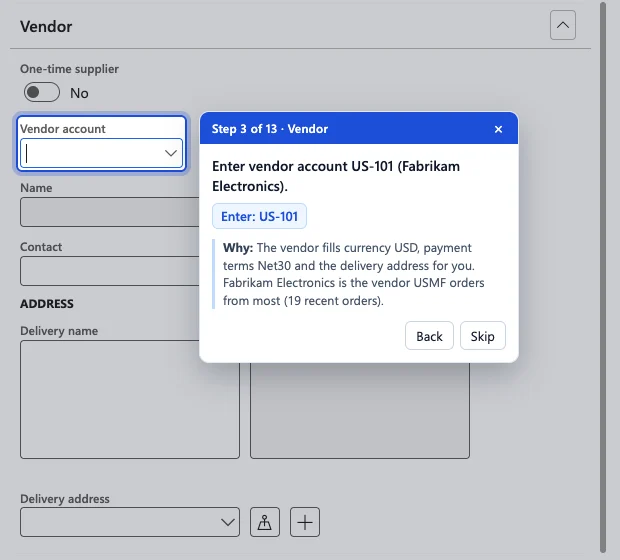
- A guide puts a spotlight on the field or button. The step card says what to do, the value to enter and why.
- It moves on by itself when the step is done and keeps its place across page loads. "Open it for me" opens the right page for a step.
Learning paths per role
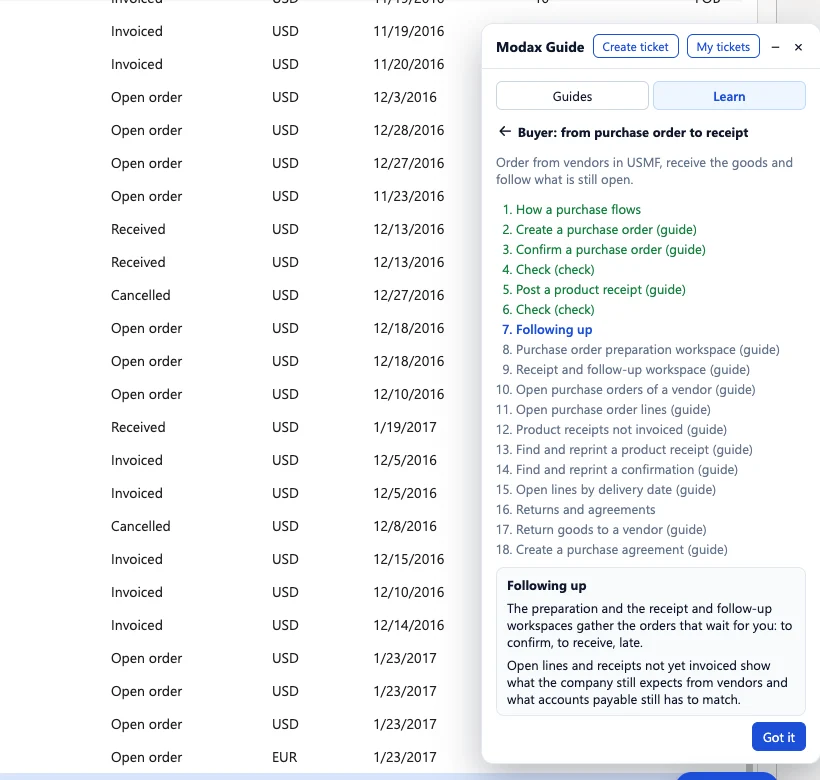
- Short lessons, check questions and the guides of that role in working order.
- Each user sees their own progress, for example on "Buyer: from purchase order to receipt".
- Paths for 10 roles, from the accountant to the warehouse office.
Plain questions, on the page
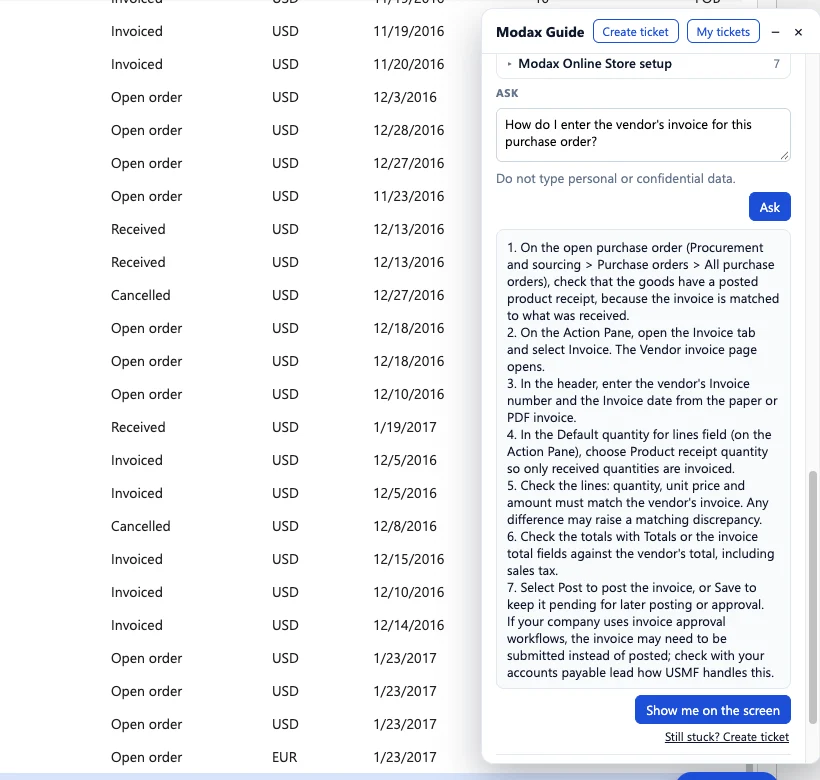
- A question box: "How do I ...". The user asks in plain words about the page they are on and gets an answer.
- When one of your guides fits, the answer offers "Show me on the screen", which starts that guide.
- Setup changes and new needs go to Modax with "Ask Modax", never as steps to change your system.
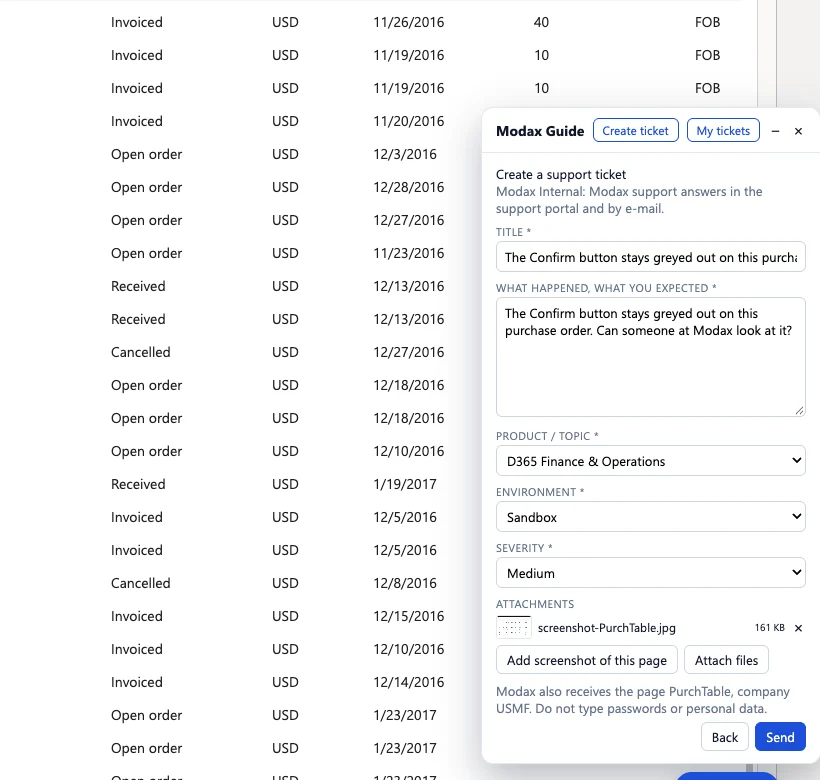
A ticket from the screen
- From the panel, or from an Ask answer, already filled in.
- The ticket carries the page, the company and the guide step the user was on. "Add screenshot of this page" and "Attach files" go with it.
- "My tickets" opens the user's tickets in the Modax support portal, already signed in. For customers with a Modax support agreement.
What it covers
More than 150 guides across 11 areas.
Standard guides for the daily work in Finance and Operations, and learning paths that put them in working order for each role.
Areas
- General ledger
- Accounts payable
- Accounts receivable
- Procurement and sourcing
- Sales and marketing
- Inventory management
- Warehouse management
- Production control
- Cost management
- Product information management
- Master planning
Learning paths
- Accountant
- Buyer
- AP clerk
- AR clerk
- Sales office
- Inventory controller
- Warehouse office
- Production supervisor
- Cost accountant
- Product data
In your implementation
Test the design before UAT, not after.
In a Modax implementation the same guides carry the project. Your key users play the designed processes on the screen during design, and UAT runs on them with proof per step.
Scenarios
Your scenario list comes in from Excel. Each scenario shows Ready when its guide is approved on the Modax reference environment.
Approval before UAT
Your key users play the designed processes step by step during design, then Approve or Comment. Gaps show up before testing starts.
UAT rounds with proof
Pass or Fail with proof per step. Each round is kept, so you see what passed in UAT 1 and what changed for UAT 2.
Flows across people
Processes that cross people, such as buyer, warehouse, AP clerk and approver, run as one flow and hand the document number on.
Sign-off sheet
A PDF per round, keyed by scenario ID, ready for the project sign-off.
Change requests
A new need found on the way becomes a change request, approved on its own. The tested scope stays clear.
In support, a fixed or changed process comes back to your users with its ticket number, and your approval resolves the ticket.
Your data
Only what it needs.
- For Ask, the extension sends only the page name, the company and the question. Never record data.
- Modax works in your environments with the access your project and your company policy set. The extension itself never changes your data in Finance and Operations.
Questions we hear first
Which Dynamics 365 products does it work with? +
Dynamics 365 Finance and Operations today. Business Central is coming in the next release.
Does Modax Guide change anything in our system? +
Modax Guide itself changes nothing. It only points: it never clicks, types or changes anything for the user. Setup changes are part of your project, made by Modax consultants with the access your project and your company policy give them.
Can we use Modax Guide in our production environment? +
Yes. Modax Guide works on your live Finance and Operations environment too, and your users can create tickets from there.
Who writes the guides? +
More than 150 standard guides across 11 areas are ready. Modax builds them from your own setup, and a Modax consultant plays and approves each one on your sandbox before your users see it.
What does the Ask box send? +
Only the page name, the company and the question. Never record data. The details are in the privacy policy.
How do users get it? +
Modax Guide runs as a browser extension in Microsoft Edge and Google Chrome, on your own Finance and Operations pages. We set it up with your team.
Can we use it during the implementation? +
Yes. Your key users test the designed processes step by step during design, before UAT. UAT rounds keep Pass or Fail with proof per step, and each round gives a sign-off sheet.
Can users raise a ticket from it? +
Yes, for customers with a Modax support agreement. The ticket carries the page, the company and the guide step, with a screenshot if the user adds one. Without a support agreement, "Ask Modax" sends a request for a quote.
See a guide run on Finance and Operations.
One session: a guide from start to finish, a learning path, a question with "Show me on the screen", and a ticket from the page.